No brush, no polish needed

Damage free application & removal

Anytime, anywhere application
How the Livi Subscription Works
1. Pick Your Shades
You can switch it up (or not) each month in your account.

2. Set Your Schedule
Pick how many manis you want each month.

3. Unbox & Enjoy
Fresh manis, straight to you.
After 3 months, pause or cancel anytime.
Exclusive VIP perks and early access to color drops.
Press
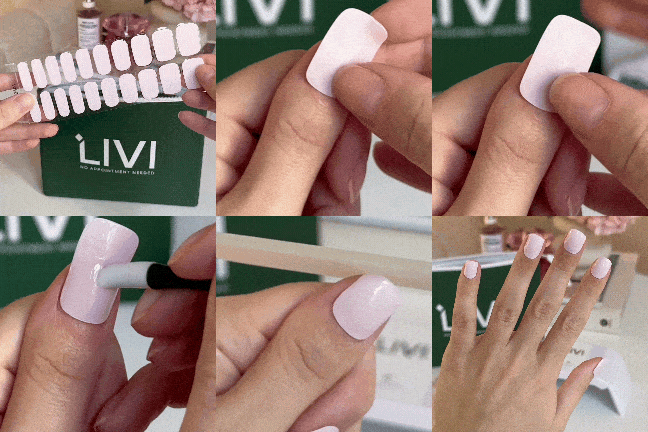
Press the nail onto your finger
Precut
Precut your mani with scissors
Protect
Put your mani under the UV lamp for 60 seconds
Perfect
File in one direction i n your desired style
Frequently asked questions
What are the perks of a Livi Beauty subscription?
Oh, just the VIP treatment you deserve. A Livi Beauty subscription gets you:
✔️ Fresh manis, on repeat – Your fave shades delivered like clockwork.
✔️ 20% off additional products – Because your nails should look expensive, not be expensive.
✔️ Early access to new drops – Be the first to snag our latest, before everyone else catches on.
✔️ Zero effort, all reward – Set it, forget it, and always have the perfect mani on hand.
Basically, it’s effortless, stylish, and just makes sense—kind of like you.
How do I change the colors of my subscription?
Easy. Just log into your accountgo click the "subscriptions" tab and select Manage Subscription, and edit out your shades. Feeling bold? Try something new. Sticking to your signature look? We respect it. Either way, you’re in control. 💅
Need help? Our team’s got you—just reach out.
What if I need new colors right away?
Log into your Livi Beauty accountt, click Manage Subscription, and adjust your next shipment date to be earlier. Need them yesterday? Place a one-time order, and we’ll get your new shades on their way— at a 20% discount!
Until what day can I make any changes to my next delivery?
You have until 24 hours before your shipment ships out to edit your colors. You will receive an email 3 days before your renwal date reminding you.
How do I change my renewal date?
Log into your Livi Beauty account, click Manage Next Order, and click "delay date".
How do I skip my subscription one time?
Log into your Livi Beauty account, click Manage Next Order, and click "skip"